In Part 1 we built a Nautobot job that pulls device inventory from Panorama — hostname, model, IP, software version, status. It works great as a foundation, but there's one thing that could be really useful for big environments: role and location were hardcoded or purely prefix-derived. No flexibility at all. If you have a more diverse environment — different device roles, multiple locations not always inferrable from IP — you quickly hit the ceiling.
So let's fix that.
Why do we even need tags?
Think about what you actually want to do with your Nautobot inventory once it's populated. A flat list of firewalls all stamped with role Firewall and a location from IP lookup doesn't get you very far.
A few real examples:
GlobalProtect gateways. Some of your firewalls are also GP gateways — they have real end users connected to them at any given moment. That changes everything about how you approach maintenance. You want to know exactly which devices those are before you start any upgrade window, not figure it out from a config audit mid-change. Tag them role__GP_GW in Panorama, and Nautobot reflects it automatically.
CVE and bug targeting. A vulnerability drops that only affects a specific PAN-OS feature or hardware platform. You don't want to upgrade your entire fleet — you want to upgrade exactly the devices that are exposed and leave the rest alone. With role tags in Nautobot you can filter precisely: show me all role__Internet_Breakout devices running a version below X. Devices with a different role simply don't appear in that query, even if they're on the same software version.
Environment segmentation. nbtag__prod, nbtag__lab, nbtag__staging — once these flow from Panorama into Nautobot tags, you can scope any query or automation run to just the environment you want. No separate device lists to maintain.
The common thread: Panorama already has this context, the network team is already maintaining it. The job just makes it visible in Nautobot without anyone doing it twice.
The problem with show devices all
In Part 1 we used Panorama's operational command to get our devices:
entries = pano.op("show devices all", cmd_xml=True).findall(".//devices/entry")This gives us great live state — connected/disconnected, IP, software version. But here's the catch: Panorama does not return device tags through the operational API. Tags live in the configuration tree, not in the operational state. So no matter how many tags you have set on your devices in Panorama, they won't show up in show devices all.
This is one of those Panorama "features" that isn't immediately obvious — you look at the GUI, the tags are right there, but they just don't show up in the operational XML output.
A second API call to the rescue
To get the tags, we need to query the config tree directly. The result isn't returned — it's stored on pano.xapi.element_root. We build a {serial: [tags]} lookup dict once before the main loop:
pano.xapi.get(xpath="/config/mgt-config/devices")
tag_dict = {
    e.get("name"): [m.text for m in e.findall("vsys/entry/tags/member") if m.text]
    for e in pano.xapi.element_root.iter("entry")
    if e.get("name") and e.findall("vsys/entry/tags/member")
}
self.logger.info("Loaded Panorama tags for %d devices", len(tag_dict))
The xpath is vsys/entry/tags/member — device tags in Panorama are scoped under a vsys, not directly on the device entry.
Tag naming conventions
The idea is simple: use a prefix convention that maps tag names to Nautobot attributes.
| Prefix | What it does |
|---|---|
role__ | Looks up a Role in Nautobot and assigns it to the device |
loc__ | Looks up a Location in Nautobot and overrides the prefix-derived one |
nbtag__ | Collects Nautobot tags to be applied after save |
Inside the loop, device_role and device_location start as the defaults and get overridden only if a matching tag is found:
device_role = role
device_location = location
nbtags = []
panorama_tags = tag_dict.get(serial, [])

for tag_str in panorama_tags:
    if "__" not in tag_str:
        continue
    tag_prefix, _, value = tag_str.partition("__")
    if tag_prefix == "role":
        try:
            device_role = Role.objects.get(name=value)
        except Role.DoesNotExist:
            self.logger.warning("Panorama tag role__%s: Role not found in Nautobot – skipping", value)
    elif tag_prefix == "loc":
        try:
            device_location = Location.objects.get(name=value)
        except Location.DoesNotExist:
            self.logger.warning("Panorama tag loc__%s: Location not found in Nautobot – skipping", value)
    elif tag_prefix == "nbtag":
        nbtags.append(value)
All lookups are strict — we do not auto-create anything. A missing object produces a warning and falls back to the default. Nautobot is the authority for what's valid — a typo in Panorama should produce a warning log, not an orphaned record.
Tag assignment after save
After validated_save(), the collected nbtag values are applied:
for value in nbtags:
    try:
        device.tags.add(Tag.objects.get(name=value))
    except Tag.DoesNotExist:
        self.logger.warning("Panorama tag nbtag__%s: Tag not found in Nautobot – skipping", value)
tags.add() is additive — existing tags are never removed. Some tags on our devices are managed outside of Panorama entirely, so that's exactly what we want.
End result
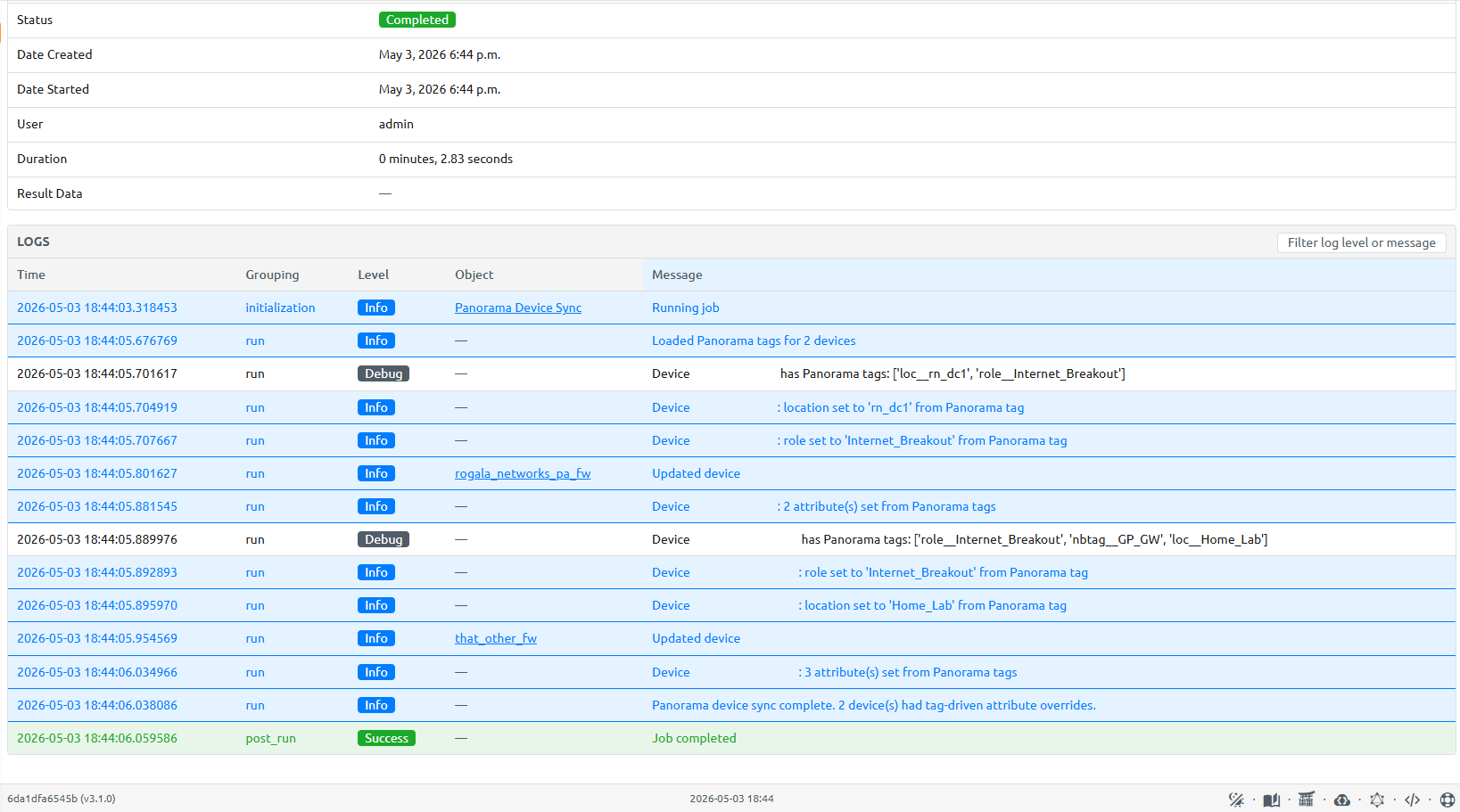
After this extension, a device with Panorama tags role__Internet_Breakout, loc__rn_dc1, and nbtag__GP_GW will land in Nautobot with:
- Role:
Internet_Breakout(instead of the genericFirewall) - Location:
rn_dc1(instead of whatever the prefix lookup returned) - Tag:
GP_GW
All without anyone touching Nautobot directly. The network team manages it through their normal Panorama workflow.
You can check out the full updated job on my GitHub.
Conclusion
This two-call pattern — operational for live state, config tree for metadata — unlocks a lot of flexibility without adding any complexity on the Panorama side. The tag naming convention is a cheap way to give the network team control over how devices land in Nautobot.
Remember to schedule the job to run regularly — same as in Part 1, the frequency depends on how often your environment changes.
Stay tuned!